
1. Is the Modem Powered On?
Behind the door, you will find a Teltonika modem. Most likely, you have one of these models (or a similar one):
Verify that the modem has power by checking if the small LED lights on the side of the modem are illuminated.
-
No power? – Check that the other devices in the cabinet have power (GolfNext relay, ball machine mainboard). Look for any broken cables or defective cable connections.
-
Power OK? – Try unplugging the power cable from the modem, wait 10 seconds, and plug it back in. Allow the modem 2–3 minutes to restart, and then check if the issue is resolved.
2. Does the cable provide internet?
The golf club provides internet to the GolfNext system via a LAN cable. The first thing you should do is check that there is a working internet connection in the connected cable.
-
Disconnect the LAN cable from the WAN input on the Teltonika modem.
-
Connect the LAN cable with the internet directly into the Valina or Verifone(payment unit). The existing black/grey LAN cable is taken out, and the internet cable from the modem is connected directly into the marked socket on the Valina terminal (see image).
VALINA:
VERIFONE:
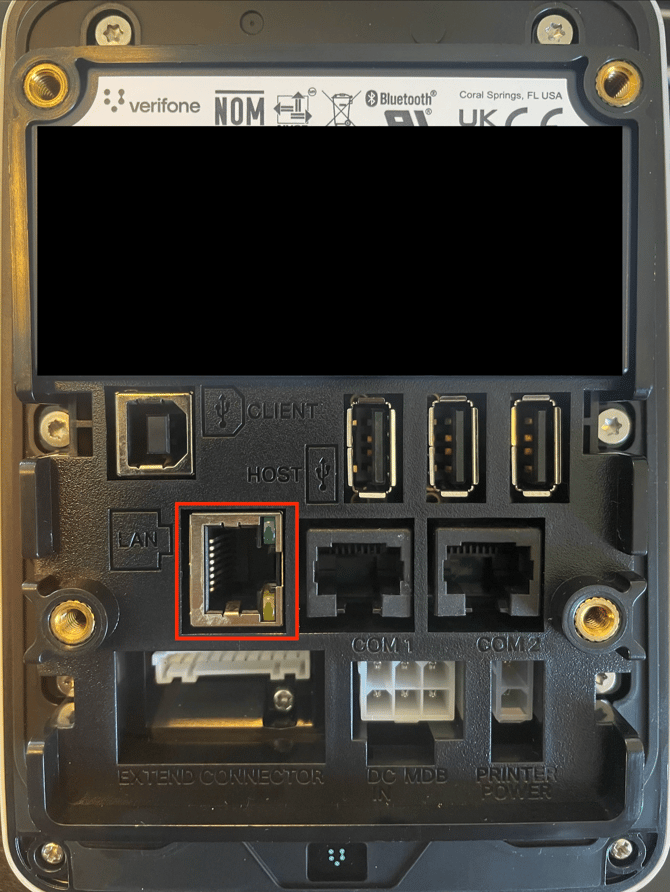
-
No internet connection? – Troubleshoot the golf club's network to find out where the fault is occurring. You may need to contact your local electrician or IT supplier.
-
Internet connection OK? – Read on below...
3. Is the 4G (Mobile) Backup Connection Working?
The purpose of the Teltonika modem is to switch over to the 4G (mobile) internet if the wired internet fails. The 4G connection is solely a backup solution and is not recommended as the primary connection for the driving range system.
You can check if there is a mobile connection by seeing if the 5 signal LEDs on the side of the modem are lit up.
-
No light in the signal LEDs? – Try unplugging the power cable from the modem, wait 10 seconds, and plug it back in. Give the modem 2–3 minutes to restart, and see if the issue is alleviated. If that doesn't help, remove the SIM card from the modem by pressing the small button with a pointed object, such as a pen or a paperclip, and reinstall the SIM card.
-
Lights OK? – Check that the LAN cable runs from the LAN/LAN1/LAN2 socket in the modem and into the Valina payment terminal, and that the connector is seated correctly. Unplug and re-plug the LAN cable at both ends, checking that it makes a 'click' when you insert the cable—if it doesn't, this indicates a poor connection or broken cable. Try using a new cable (standard LAN cable).
Thank you for reading - feel free to contact us in case you have any questions, suggestions or general feedback.