
You can click this LINK to access the site otherwise on the admin site you find it here:
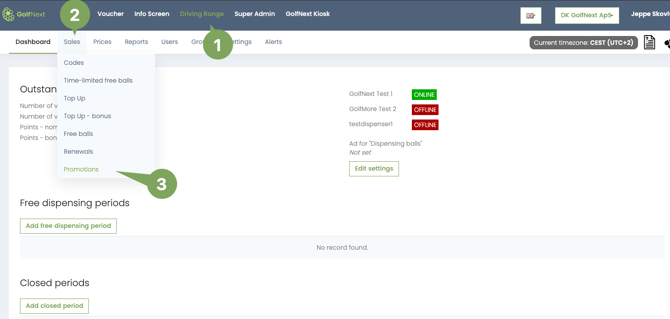
Overview of the Site/List
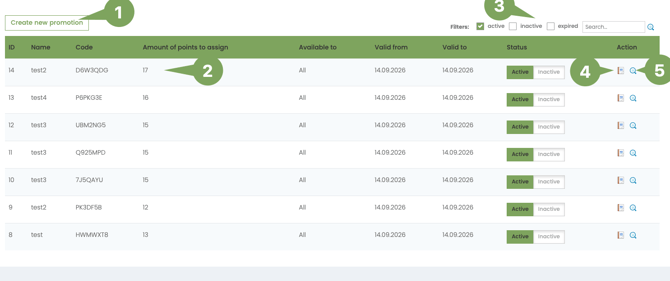
- Create new promotion - here you create a new promotion
- Edit - Clicking on a Promotion will let you edit an existing promotion
- Search Bar - Here you can search promotions and filter for exprid and inactive.
- Usage - Get a list of who have redeemed the promotion
- View - Here you can view the promotion code, QR code, downloadable QR.
Create a new promotion
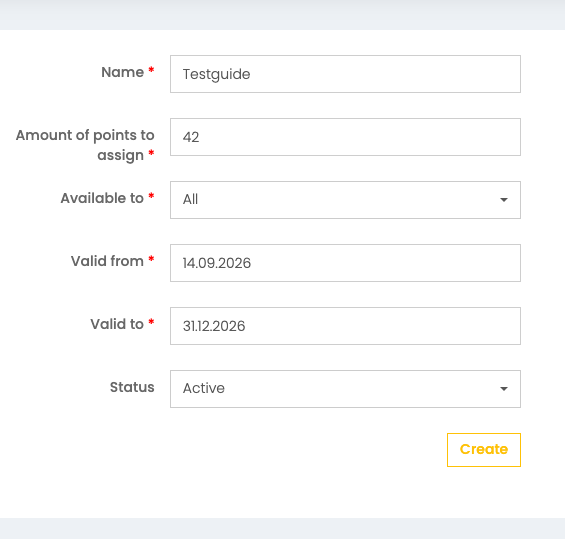
Clicking 'Create a new promotion' you will presented with fields to fill.
Name - name it something fitting for what you are promoting
At the moment promotions only include points that can be added to an account just like a Top-Up
Available to - Who can scan/use the code?
New users - Users that have no connection beforehand
Club members - Users that have a membership at your club
Non members - Users who don't have have a membership at your club, but already have a connection to your club.
Valid to/from - Choose for how long the promotion should last, this can be edited afterwards if you want to extend a promotion or end it earlier.
View the promotion
Clicking on the magnifying glass(5) lets you see the promotion
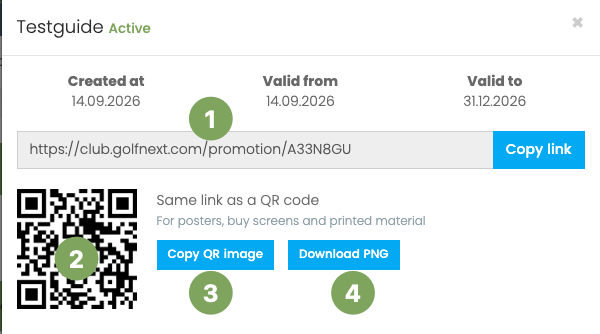
There is 4 options here
- URL-Link can be added to a newsletter as an example
- Scanable QR-code to test it or use right away
- You can copy the QR-Code and add it to an newsletter or a poster
- Download the picture which can be printed alone or added to a poster