
Each club decides which products it sells in the app. Some products are for everyone, while others are only for the club's members. So the products you see can be different from club to club, and from player to player.
Points are what you spend on balls at the driving range. Buy them in the GolfNext app and they are on your account right away. Here is how.
1. Find Your Club
- Open the GolfNext app and tap Shop at the bottom of the screen.
- At the top you see a country. The app picks one for you, and you can tap it to choose another country.
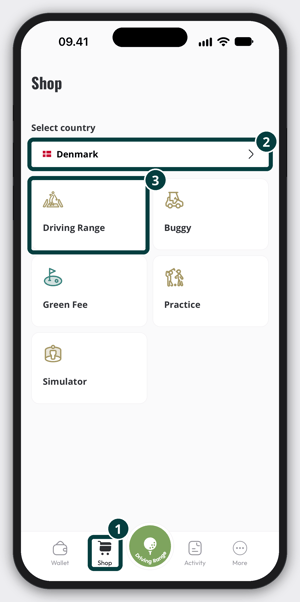
- Tap Driving Range.
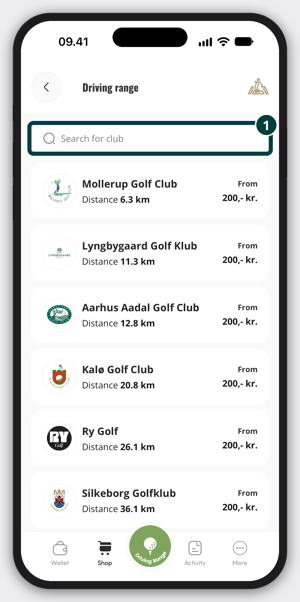
- Choose the club you want to buy points from. Use the Search for club field to find it faster. If location is turned on for the app, the clubs closest to you come first, with the distance. If location is turned off, the clubs are listed from A to Z without a distance.
2. Choose A Product
You see the products the club has made available to you. Tap the one you want. A few things to know:
- Some products come with bonus points. For example, you pay 500 and get 600 points.
- Some products are limited. A club can limit how many it sells in total, how many each player can buy, or when a product can be bought. If you can't buy a product, it may be sold out, you may have reached your limit, or it may not be for sale today.
- If a product is limited, the units are reserved for 5 minutes while you pay. If another player is paying for the last ones, you may need to try again a few minutes later.
- A product can have a short description from the club.
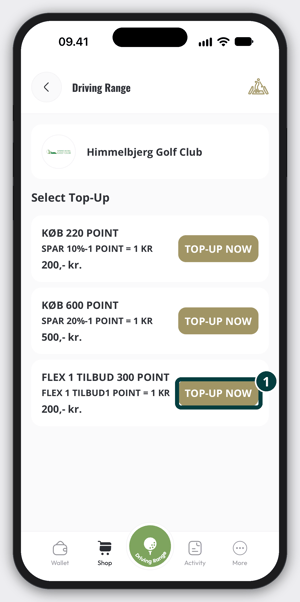
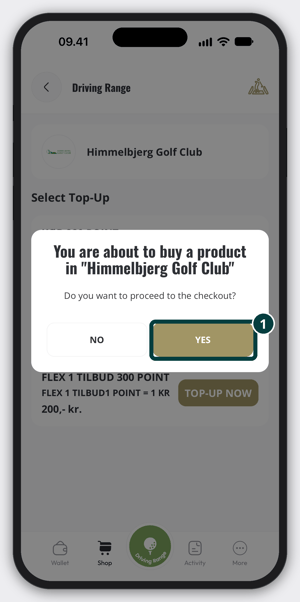
Tap Top-Up now on the product you want. The app asks if you want to go to the checkout for that club. Tap Yes. If you bought the same product in the last couple of minutes, the app asks first if you want to buy it again.
3. Pay
- Follow the steps in the app to go to the payment. The payment screen can look a little different depending on the club and which phone you use.
- Pay with Apple Pay on an iPhone or Google Pay on an Android phone, or pay with your card. Apple Pay and Google Pay only show if your phone supports them.
- If you pay by card, you can choose to save it, so it is quick to add more points next time. How a card is saved depends on the club's payment provider: at some clubs you find it again under Saved cards, at others the payment screen offers to save your details for a faster checkout.
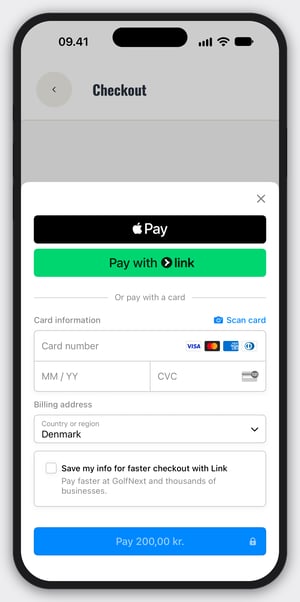
When the payment goes through, the app shows Payment successful.
4. Use Your Points
When the payment is done, the app opens Wallet. Your points are added to your account for that club, and the club's card in Wallet shows them. The app also sends you a message with the number of points you got and your new total.
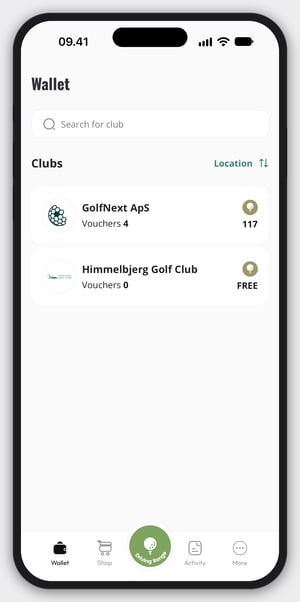
Now you can spend them on balls at the driving range. See Dispense Balls With The GolfNext App for how.
Can't Find The Club Or The Product?
- The product may be for members only. The club decides who can see each product.
- Some clubs don't sell points in the app.
- Check the country at the top of the Shop. Clubs are listed per country.
- If you are not sure, ask the club.
Your purchase is made directly with the club. No part of the payment goes through GolfNext, since we are the technical provider of the app. If you have questions about a product you bought, or need a refund, contact the golf club or the driving range.
Thank you for reading - feel free to contact us in case you have any questions, suggestions or general feedback.