
This guide is for logging in to the GolfNext app with your email address and password.
Forgot your password? You can set a new one in a few minutes. We send a link to the email address connected to your account, and you choose a new password there.
1. Ask For A Reset Link
- Open the GolfNext app, select your country and tap Continue.
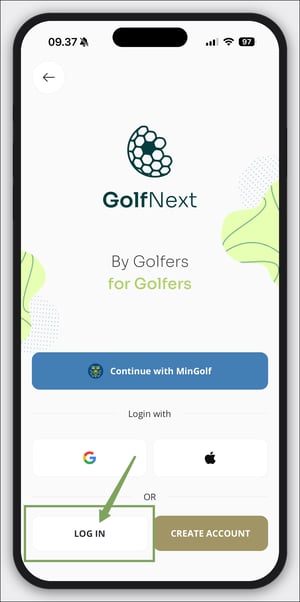
- If the app shows several ways to sign in, tap LOG IN.
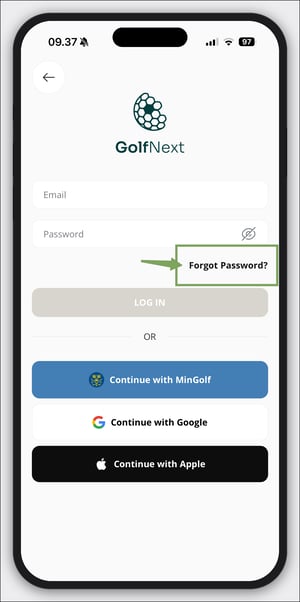
- Tap Forgot Password? below the password field.
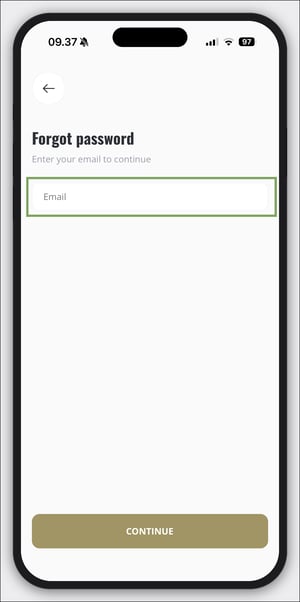
- Under Enter your email to continue, type the email address connected to your GolfNext account and tap Continue.
- A message says We sent you email with the recovery link! and shows your email address. Tap OK.
Not sure which email address your account uses? See Find The Email Connected To The App.
2. Set A New Password
- Open the email we sent you and tap Recover password.
- A page called Restore Password opens in your browser. Type your new password in New password and type it again in Repeat new password.
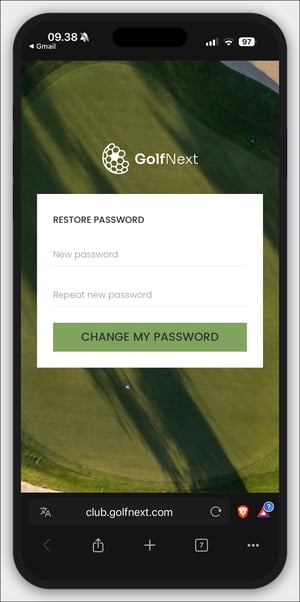
- Tap Change my password. The page confirms Password changed successfully.
The link works once and stays valid for 12 hours. If it has expired, ask for a new one as described in step 1.
3. Log In With Your New Password
Go back to the GolfNext app, enter your email address and your new password, and tap LOG IN.
If Something Goes Wrong
- No email arrives: check your spam folder and make sure you typed the address correctly.
- The app says the email was not found: no account uses that address. Try another address you may have used when you signed up.
- The app says a reset email has already been sent to this address: you can ask for a new email once every two minutes. Check your inbox, or wait two minutes and try again.
- You log in with MinGolf in Sweden: your password is managed at mingolf.golf.se, where you use Forgot password. See Cannot Log In To The App - Swedish Users.
Thank you for reading - feel free to contact us in case you have any questions, suggestions or general feedback.