
This guide is for golfers in Sweden who log in to the GolfNext app with their Golf-ID. Your Golf-ID and password are the same ones you use for MinGolf, so we can't reset your password for you. You reset it at MinGolf.
Can't get into the GolfNext app? Most of the time it is a mistyped Golf-ID or an old password. Follow the steps below, then look up the message the app shows to see what to do next.
1. Log In With MinGolf
- Open the GolfNext app. On the Select country screen, check that the country is Sweden. To change it, tap the country field and choose Sweden.
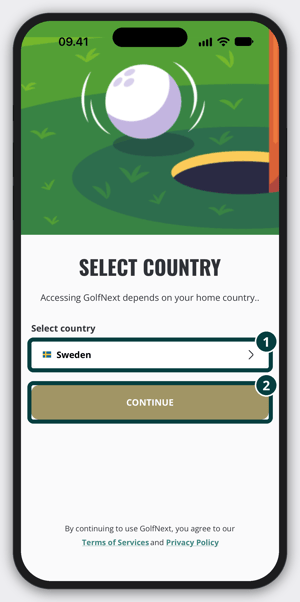
- Tap Continue.
- Tap Continue with MinGolf.
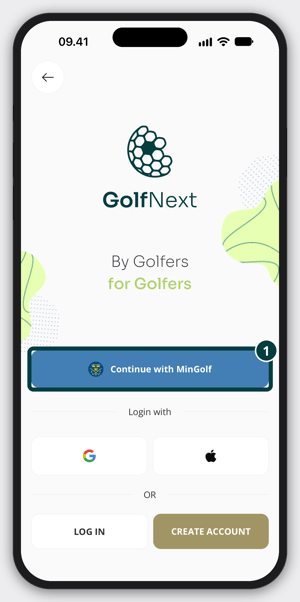
- In the Golf-ID field, type your Golf-ID. Type the digits only, the app adds the dash for you.
- In the Password field, type your MinGolf password. To check what you typed, tap the eye icon at the right end of the field.
- Tap LOG IN.
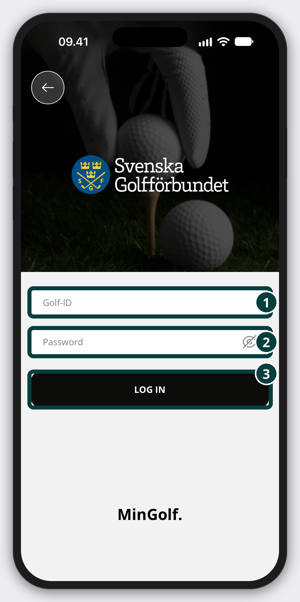
- If the app asks Do you have a GolfNext account?, tap YES.
2. Check Your Login At MinGolf
If the app won't let you in, first check that your details work at MinGolf.
- Go to mingolf.golf.se and log in with your Golf-ID and password.
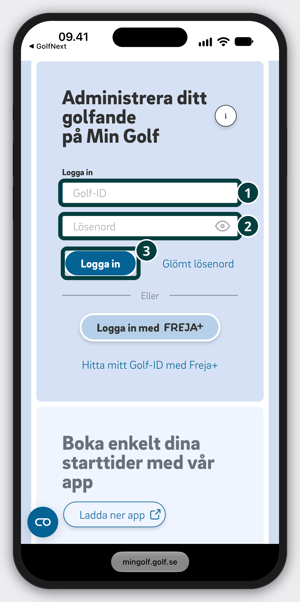
- If the login doesn't work there either, use Glömt lösenord (Forgot password) on the MinGolf page and choose a new password.
- Go back to the GolfNext app and log in again as described in step 1, with the new password.
What The App Message Means
When the login fails, the app shows a message under the fields. It is in Swedish. Find yours below.
- Felaktigt Golf-ID eller lösenord. Kontrollera uppgifterna och försök igen. Check your Golf-ID and password, then follow step 2 to see if they work at MinGolf.
- Vi kunde inte hitta något konto för det Golf-ID:t. The Golf-ID isn't known. Tap the link Kontrollera ditt Golf-ID på mingolf.golf.se below the message to look it up, then try again.
- Ditt konto är låst. Tap the link Lås upp det med ”Glömt lösenord” på mingolf.golf.se below the message and choose a new password at MinGolf. Then log in to the app again.
- Den här inloggningen är endast för svenska golfare. The Golf-ID doesn't belong to a Swedish golfer. If your club is in another country, go back, select that country and log in the way the app shows for it.
- Golfens IT-system (GIT) svarar inte just nu. This is not a problem with your details. Wait a few minutes and try again.
- Dina uppgifter godkändes, men inloggningen kunde inte slutföras. Försök igen. Tap LOGGA IN once more. If it keeps happening, contact us.
- Vi kunde inte logga in dig. Försök igen. or Kontrollera din internetanslutning och försök igen Check that your phone is online and try again.
Still Can't Log In?
Contact us and tell us the exact message the app shows. Don't send your password.
If you log in with an email address and password instead of MinGolf, see Forgotten Password.
Thank you for reading - feel free to contact us in case you have any questions, suggestions or general feedback.